In the dynamic landscape of communication technology, 4G LTE Push-to-Talk (PoC) radios have emerged as a game-changer, offering instant and reliable communication for various industries. As a leading provider of 4G LTE PoC radios, I understand the importance of customizing these devices to meet the unique needs of our clients. In this blog post, I will share some insights on how to customize the settings of 4G LTE PoC radios to optimize their performance and functionality. 4G LTE Poc Radio
Understanding the Basics of 4G LTE PoC Radios
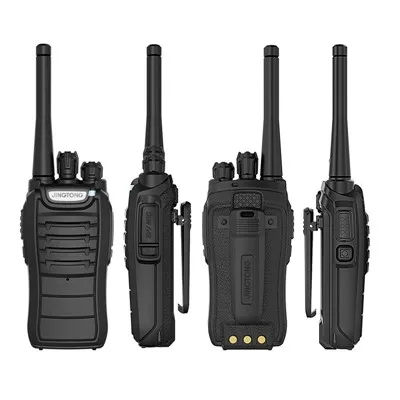
Before delving into the customization process, it’s essential to have a basic understanding of 4G LTE PoC radios. These devices utilize the 4G LTE network to enable push-to-talk communication, similar to traditional two-way radios but with the added benefits of wider coverage, higher data speeds, and advanced features.
4G LTE PoC radios typically come with a range of default settings that are designed to provide a general level of functionality. However, these settings may not always meet the specific requirements of every user or organization. That’s where customization comes in.
Customizing the Settings of 4G LTE PoC Radios
Customizing the settings of 4G LTE PoC radios involves adjusting various parameters to optimize their performance, functionality, and user experience. Here are some key areas to consider when customizing your 4G LTE PoC radio settings:
1. Network Settings
The first step in customizing your 4G LTE PoC radio is to configure the network settings. This includes selecting the appropriate network operator, setting up the APN (Access Point Name), and adjusting the network mode.
- Network Operator: Choose the network operator that provides the best coverage and service in your area. Most 4G LTE PoC radios support multiple network operators, allowing you to switch between them as needed.
- APN: The APN is a gateway between your device and the internet. It is essential to configure the correct APN settings to ensure seamless connectivity. Contact your network operator for the specific APN settings required for your device.
- Network Mode: Select the network mode that is compatible with your device and the network operator. Most 4G LTE PoC radios support both 4G LTE and 3G network modes, allowing you to switch between them depending on the availability of the network.
2. Call Settings
Customizing the call settings of your 4G LTE PoC radio can enhance the quality and reliability of your communication. Here are some key call settings to consider:
- Call Group: Create call groups to organize your contacts and facilitate group communication. You can create multiple call groups based on different departments, teams, or projects.
- Call Priority: Set the call priority for different call groups to ensure that important calls are always prioritized. This can be particularly useful in emergency situations or when dealing with critical tasks.
- Call Timer: Set a call timer to limit the duration of each call. This can help prevent long and unnecessary conversations and ensure that your communication is efficient and productive.
3. Audio Settings
The audio quality of your 4G LTE PoC radio is crucial for clear and effective communication. Here are some audio settings to consider:
- Volume: Adjust the volume of your device to ensure that you can hear the incoming calls clearly. You can also set different volume levels for different call groups or situations.
- Equalizer: Use the equalizer settings to adjust the audio frequency and enhance the sound quality. This can be particularly useful in noisy environments or when dealing with poor audio quality.
- Noise Cancellation: Enable the noise cancellation feature to reduce background noise and improve the clarity of your voice. This can be particularly useful in outdoor or industrial environments.
4. Display Settings
Customizing the display settings of your 4G LTE PoC radio can enhance the user experience and make it easier to use. Here are some display settings to consider:
- Brightness: Adjust the brightness of your device to ensure that you can see the screen clearly in different lighting conditions. You can also set different brightness levels for different call groups or situations.
- Contrast: Use the contrast settings to adjust the contrast of the screen and enhance the readability of the text. This can be particularly useful in low-light environments or when dealing with small text.
- Screen Lock: Enable the screen lock feature to prevent accidental button presses and protect your device from unauthorized access. You can also set a password or PIN to further secure your device.
5. Security Settings
Security is a top priority when it comes to communication devices. Here are some security settings to consider:
- Password Protection: Set a password or PIN to protect your device from unauthorized access. You can also set different passwords for different call groups or situations.
- Encryption: Enable the encryption feature to protect your communication from eavesdropping and interception. This can be particularly useful in sensitive or confidential communication.
- Remote Management: Use the remote management feature to manage your device remotely and ensure that it is always up-to-date with the latest security patches and software updates.
Benefits of Customizing the Settings of 4G LTE PoC Radios
Customizing the settings of your 4G LTE PoC radio can offer several benefits, including:
- Improved Performance: By optimizing the network settings, call settings, audio settings, display settings, and security settings, you can improve the performance and functionality of your device.
- Enhanced User Experience: Customizing the settings of your device can make it easier to use and more user-friendly. This can improve the overall user experience and increase productivity.
- Increased Security: By enabling the encryption and password protection features, you can protect your communication from eavesdropping and interception. This can increase the security and privacy of your communication.
- Cost Savings: By customizing the settings of your device, you can reduce the amount of data usage and save on your monthly phone bill. This can be particularly useful for organizations with large numbers of users.
Conclusion
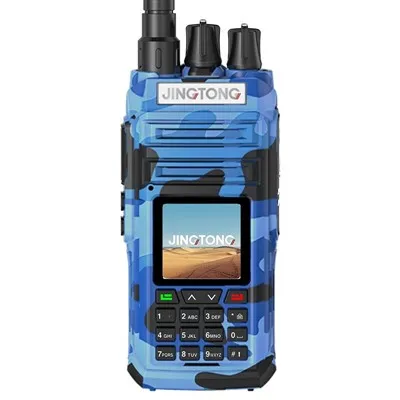
Customizing the settings of your 4G LTE PoC radio is an important step in optimizing its performance, functionality, and user experience. By following the tips and guidelines outlined in this blog post, you can customize your device to meet the unique needs of your organization and ensure that your communication is clear, reliable, and secure.
3 Watt Walkie Talkie If you are interested in learning more about our 4G LTE PoC radios or would like to discuss your specific requirements, please contact us. Our team of experts will be happy to assist you in finding the right solution for your organization.
References
- "4G LTE Push-to-Talk (PoC) Radios: A Comprehensive Guide." TechTarget.
- "How to Customize Your 4G LTE PoC Radio Settings." Mobile Nations.
- "The Benefits of Customizing Your 4G LTE PoC Radio." Business Insider.
Jingtong (Quanzhou) Electronics Co., Ltd.
We are one of the most professional 4g lte poc radio manufacturers and suppliers in China, specialized in providing high quality customized service. We warmly welcome you to buy durable 4g lte poc radio made in China here from our factory. For price consultation, contact us.
Address: No.288, Si Huang Industry Zone, Xia Mei Town, Nan An, Quanzhou, Fujian province, China 362302
E-mail: jtdjj@jtdjj.com
WebSite: https://www.jteradio.com/
